
Please check the content of the Terms of Use.
FAQ
Q: How much is the test fee?
A: There is no fee for taking the TTBJ.
Q: What happens if I stop the test part-way through?
A: If you log in again, you can continue taking the test from the beginning of the section at which you stopped. Please note that the Test Results Sheet PDF will not be displayed if you do not complete all of the test sections.
Q: Is it possible to extend the test time or use a screen reader?
A: TTBJ does not support these features. Please arrange individual accommodations on the part of the test administrator.
Q: Can I take the test using a tablet or smartphone?
A: We recommend using a personal computer (PC) for taking the test. For details, please refer to "System Requirements".
Q: My computer failed the systems check.
A: It is not possible to take the test using this operating system with these specifications. Please switch to a computer that meets the system requirements to take the test.
Q: I cannot hear the audio.
A: Please check that your machine’s speaker is turned on. Also, please check that the headphones are connected correctly.
Q: Questions are not being displayed.
A: Please re-start the test from the log-in screen.
Q: I accidentally closed the browser.
A: Please re-start the test from the log-in screen.
Q: I accidentally pressed the “Back” button on the browser and an “Error” message was displayed.
A: Please re-start the test from the log-in screen.
Q: I have not received a “Test Application Completed” notification e-mail.
A: The e-mail may have been sorted to your spam folder instead of your inbox. Please check your spam folder.
Q: I have not received a “Test Completed” notification e-mail.
A: The e-mail may have been sorted to your spam folder instead of your inbox. Please check your spam folder.
Questions about Testing for Individuals
Q: How can I check my test results?
A: You can check your test results in a PDF file displayed on the screen after you complete the test and also download the PDF file. In addition, an e-mail with the web address for viewing the PDF of your test results will be sent to your registered e-mail address.
Q: Are test results disclosed to anyone other than examinees?
A: If you register the e-mail address of a person other than yourself (the examinee) when you apply to take the test, an e-mail with the web address for viewing the PDF of your test results will also be sent to that e-mail address.
Questions about Testing for Groups
Q: Is it necessary for all the examinees to take the test at the same venue on the same day?
A: There is no need for all the examinees to take the test at the same venue on the same day. On the application form, if you give the test period as “DD/MM – DD/MM”, allowing ample time for examinees to take the test, you will be issued IDs and passwords that are valid for that period.
Q: How is the test proctor able to learn examinees’ test results?
A: The test administrator will receive a notification e-mail each time an examinee completes the test. In addition, test results can be viewed through the dashboard after the testing period has ended.
Q: Can individual examinees also view their test results?
A: Yes. examinees can view their score report PDF on the screen immediately after completing the test. A link to access the score report PDF will also be sent to each examinee’s registered e-mail address.
Q: There are multiple subjects on which I would like examinees in my group to be tested. Is it possible to have a customized test set put together for my group?
A: Please select a set of test subjects from the list provided. It is not possible to put together customized test sets. If the test you wish your examinees to take is not on the list, it is possible for examinees to take the test twice (albeit with different IDs and passwords).
Q: What should I do if I am not sure about the number of examinees?
A: For “Number of Examinees”, please enter a number as close as possible to the actual number of examinees. If you are unsure of the number of examinees, please enter an estimated number at the upper end of the possible range.
Q: How can I obtain the IDs and passwords?
A: IDs and passwords can be downloaded from “Download Examinee CSV” under Step 1: Examinee E-mail Settings in the test workflow section of the test details page. They are not distributed by e-mail.
Q: Is there a way to download all examinees’ results at once?
A: Yes. You can download the results from “Download Results as CSV” under Step 4: Results Confirmation in the test workflow section of the test details page. The CSV file contains each examinee’s overall score as well as scores for each test component.
Q: The testing period has ended, but I have not received the score data.
A: For test applications submitted through the new system from May 2026 onward, score reports must be downloaded directly by the applicant. Results are no longer sent by e-mail.
Q: Is it possible to shorten or extend the testing period?
A: Yes. The testing period can be shortened or extended upon request by contacting the administrative office. However, the end date cannot be set more than six months after the test start date.
Questions about System Requirements
Q: With which Windows OS versions is the test system compatible?
A:To run the test, your computer must have an OS of Windows 8.1 or above. For details, please refer to "System Requirements".
Q: Is it possible to take the test on a Mac computer?
A: Yes, it is possible to take the test on a Mac computer.For details, please refer to "System Requirements".
Q: Are there any limits on internet connection speed?
A: Your computer must have an internet connection speed (high-speed connection) capable of playing videos. For details, please refer to "System Requirements".
Questions about Test Questions
Q: Can I print out the SPOT questions and use them as teaching materials in the classroom?
A: The Terms of Use prohibit the use of test questions for any purpose other than the TTBJ. Please refrain from using the questions as teaching materials.
Q: Are there any reference materials available for formulating SPOT questions?
A: Please refer to the "Reference Literature Page".
Q: I am Japanese (a Japanese language teacher/member of the general public). Is it possible for me to undergo Testing for Individuals?
A: There are no limitations on eligibility to take the TTBJ. Anyone who wishes to may take the test.
Q: After completing the test, is it possible to check questions that I answered incorrectly?
A: It is not possible to check SPOT questions after completing the test. However, it is possible to check questions for the Kanji Diagnostic Test by accessing the “Results Page” displayed at the end of the section.To go back to the “Results Page”, please click the “List” button.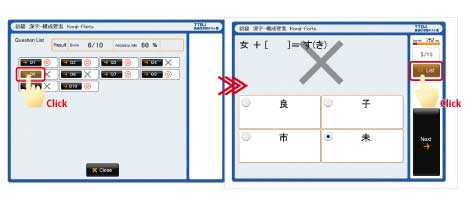
Q: What does “TTBJ” stand for?
A: “TTBJ” is the abbreviation of “Tsukuba Test-Battery of Japanese”.
Q: Who created the TTBJ?
A: The TTBJ was developed by teachers at the former International Student Center (now the Japanese Language Education Division of the Center for Education of Global Communication) at the University of Tsukuba.
Q: I conducted a survey using the TTBJ. How should I reference the TTBJ in my paper?
A:If you have written a research paper utilizing the TTBJ, please state this clearly in the paper’s Acknowledgements section. In addition, please e-mail a copy of the published paper to the Japanese Language Education Division of the Center for Education of Global Communication, the University of Tsukuba (jp-kyoten[at]un.tsukuba.ac.jp).
"This survey was conducted using the TTBJ (Tsukuba Test-Battery of Japanese) operated by The Japanese Language Support Hub for Accessible Resources and Education(J-SHARE), the University of Tsukuba."
Contact information:Japanese Language Support Hub for Accessible Resources and Education(J-SHARE), the University of Tsukuba
E-mail address for inquiries:
